Productivity features
Keyboard shortcuts
Sequential keybindings: Some annotation schemes provide keybindings
for selecting options. For tasks where there are at most 10 options,
keybindings can be assigned sequentially by default. When defining your
annotation scheme, set the sequential_key_binding field to True.
The first option will correspond to the \"1\" key, the second to the \"2\" key, ..., the tenth to the \"0\" key.
Custom keybindings: For greater control, custom keybindings can also
be configured. In this case, pass in objects into the labels field of
the annotation scheme. Each label object can take a key_value field
specifying the key that corresponds to it.
For example,
"annotation_schemes": [
    {
        "annotation_type": "multiselect",
        "labels": [
            {
              "name": "Option 1",
              "key_value": '1'
            },
            {
              "name": "Option 2",
              "key_value": '2'
             }
          ]
      }
]
Keybinding Allocator
When multiple annotation schemas appear on the same page, keyboard shortcuts can conflict. The keybinding allocator automatically assigns non-conflicting keys across all schemas by drawing from separate key pools.
Keybinding Strategies
Each schema can declare its keybinding strategy via the keybinding_strategy field:
| Strategy | Description |
|---|---|
sequential |
Labels are assigned keys in order from a key pool (default) |
mnemonic |
Keys are assigned based on the first available character of each label name |
none |
No keybindings are allocated for this schema |
annotation_schemes:
  - annotation_type: "radio"
    name: "sentiment"
    keybinding_strategy: "sequential"  # or "mnemonic" or "none"
    labels: ["positive", "negative", "neutral"]
If keybinding_strategy is not set, schemas with sequential_key_binding: true default to sequential.
Multi-Schema Key Pools
For sequential allocation, keys are drawn from three pools corresponding to QWERTY keyboard rows. Each schema that needs sequential keys gets its own pool:
| Pool | Row | Keys | Capacity |
|---|---|---|---|
| Pool 0 | Number row | 1 2 3 4 5 6 7 8 9 0 |
10 |
| Pool 1 | Top letter row | q w e r t y u i o p |
10 |
| Pool 2 | Home row | a s d f g h j k l |
9 |
The first schema needing sequential keys gets Pool 0 (numbers), the second gets Pool 1 (top row letters), and the third gets Pool 2 (home row). If a pool doesn't have enough keys for all labels, the allocator searches other pools for one with sufficient capacity.
Sequential Strategy Example
With two schemas on the same page:
annotation_schemes:
  - annotation_type: "radio"
    name: "sentiment"
    keybinding_strategy: "sequential"
    labels: ["positive", "negative", "neutral"]
    # Gets Pool 0: positive=1, negative=2, neutral=3

  - annotation_type: "multiselect"
    name: "topics"
    keybinding_strategy: "sequential"
    labels: ["politics", "sports", "technology", "science"]
    # Gets Pool 1: politics=q, sports=w, technology=e, science=r
Mnemonic Strategy Example
Labels get keys based on their first available character:
annotation_schemes:
  - annotation_type: "radio"
    name: "quality"
    keybinding_strategy: "mnemonic"
    labels: ["quality", "price", "service", "ambiance"]
    # quality=q, price=p, service=s, ambiance=a
If the first character is already taken, subsequent characters are tried. If no character from the label name is available, the next free letter from a-z is used.
Explicit Key Overrides
The key_value field on individual labels always takes priority over automatic allocation. Explicitly set keys are reserved globally before any automatic allocation begins:
annotation_schemes:
  - annotation_type: "radio"
    name: "sentiment"
    keybinding_strategy: "sequential"
    labels:
      - name: "positive"
        key_value: "p"      # Explicit: always "p"
      - name: "negative"
        key_value: "n"      # Explicit: always "n"
      - "neutral"            # Auto-assigned from remaining pool keys
Self-Managed Schemas
Some schema types manage their own keybindings internally and are skipped by the allocator. Their known keys are still reserved to prevent conflicts:
| Schema Type | Reserved Keys |
|---|---|
pairwise |
1, 2, 0 |
bws |
1–tuple_size (numbers) and a–corresponding letter (alphabetic). Default tuple_size=4 reserves 1, 2, 3, 4, a, b, c, d |
triage |
Managed internally |
Complete Multi-Schema Example
Three schemas with different strategies on the same page:
annotation_schemes:
  # Schema 1: Sequential — gets Pool 0 (numbers)
  - annotation_type: "radio"
    name: "sentiment"
    keybinding_strategy: "sequential"
    labels: ["positive", "negative", "neutral"]
    # positive=1, negative=2, neutral=3

  # Schema 2: Mnemonic — draws from a-z (excluding globally used keys)
  - annotation_type: "multiselect"
    name: "aspects"
    keybinding_strategy: "mnemonic"
    labels: ["food", "service", "value", "atmosphere"]
    # food=f, service=s, value=v, atmosphere=a

  # Schema 3: Sequential — gets Pool 1 (top row letters, minus any used by mnemonic)
  - annotation_type: "radio"
    name: "recommend"
    keybinding_strategy: "sequential"
    labels: ["yes", "no", "maybe"]
    # yes=q, no=w, maybe=e (f,s,v,a already taken by mnemonic schema)
Admin Keyword Highlights
Potato supports admin-defined keyword highlights to help annotators identify relevant words and phrases in the text. Keywords are displayed as colored bordered boxes around matching text when an instance loads.
Configuration
Add a keyword_highlights_file to your configuration pointing to a TSV file:
keyword_highlights_file: data/keywords.tsv
The path is relative to the directory where you run the server (task_dir).
TSV File Format
The keywords file should be tab-separated with three columns:
Word    Label   Schema
love    positive    sentiment
hate    negative    sentiment
excel*  positive    sentiment
disappoint* negative    sentiment
| Column | Description |
|---|---|
| Word | The keyword or phrase to highlight (supports * wildcards) |
| Label | The annotation label associated with this keyword |
| Schema | The annotation schema name this keyword is relevant to |
Note: Use actual tab characters between columns, not spaces.
Matching Behavior
- Case-insensitive: "Love" matches "love", "LOVE", "Love"
- Word boundaries: "love" matches "love" but not "lovely" (unless using wildcards)
- Wildcards: Use
*for prefix/suffix matching: excel*matches "excellent", "excels", "excel"*happymatches "unhappy", "happy"dis*edmatches "disappointed", "dismayed"
Configuring Colors
Colors for keyword highlights are configured in the ui.spans.span_colors section, matching the schema and label names:
ui:
  spans:
    span_colors:
      sentiment:
        positive: "(34, 197, 94)"    # Green
        negative: "(239, 68, 68)"    # Red
        neutral: "(156, 163, 175)"   # Gray
If no color is specified, Potato automatically assigns colors from a default palette.
Multiple Schemas
A single keywords file can support multiple annotation schemas:
Word    Label   Schema
excellent   positive    sentiment
terrible    negative    sentiment
price   economic    topic
election    political   topic
Randomization Settings
For research purposes, you can configure keyword highlight randomization to prevent annotators from relying solely on the highlights:
keyword_highlights_file: data/keywords.tsv

keyword_highlight_settings:
  keyword_probability: 1.0       # Probability of showing each matched keyword (0.0-1.0)
  random_word_probability: 0.05  # Probability of highlighting random words as distractors
  random_word_label: "distractor" # Label for random word highlights
  random_word_schema: "keyword"   # Schema for random word highlights
| Setting | Default | Description |
|---|---|---|
keyword_probability |
1.0 | Probability (0.0-1.0) that each matched keyword is shown. Set to 0.8 to show 80% of keywords. |
random_word_probability |
0.05 | Probability of highlighting random words as distractors. Set to 0.05 to highlight ~5% of words. |
random_word_label |
"distractor" | The label applied to randomly highlighted words. |
random_word_schema |
"keyword" | The schema for random word highlights. |
Key Features:
- Persistence: Highlighted words are cached per user+instance, so the same user sees the same highlights when returning to an instance.
- Deterministic randomization: Uses a hash of username + instance_id as a random seed, ensuring reproducibility.
- Behavioral tracking: The
keyword_highlights_shownfield in behavioral data records which words were highlighted (both keywords and random distractors).
Use Cases:
- Distractor words: Add random word highlights to prevent annotators from relying entirely on keyword hints.
- Partial keyword hints: Set
keyword_probability: 0.5to show only 50% of matching keywords. - Research studies: Track which highlights each annotator saw to analyze their impact on annotation quality.
Example
See the keyword-highlights-example for a complete working example.
Tooltips
For radio and multiselect question types, you have the option to add tooltips with more details about each response option. You can do this in two ways.
Option 1: you can enter plaintext in the tooltip field and the
unformatted text will display when you hover your mouse over the
response option.
"annotation_schemes": [
{
     "annotation_type": "multiselect",
     "name": "Question",
     "labels": [
         {
           "name": "Label 1",
           "tooltip": "lorem ipsum dolor",
         },
     ]
},
]
Option 2: you can create an HTML file with formatted text (e.g.,
bold, unordered list), and pass the path to the html file to the
tooltip_file field. The formatted text will display when you hover
your mouse over the response option.
"annotation_schemes": [
{
     "annotation_type": "multiselect",
     "name": "Question",
     "labels": [
         {
           "name": "Label 1",
           "tooltip_file": "config/tooltips/label1_tooltip.html"
         },
     ]
},
]
Active Learning
Active learning uses machine learning to intelligently prioritize annotation tasks, helping you maximize the value of your annotation budget. For comprehensive configuration and usage instructions, see the Active Learning Guide.
Basic Configuration
active_learning:
  enabled: true
  schema_names: ["sentiment", "topic"]
  min_annotations_per_instance: 2
  min_instances_for_training: 20
  update_frequency: 10
  max_instances_to_reorder: 100
  classifier_name: "sklearn.linear_model.LogisticRegression"
  vectorizer_name: "sklearn.feature_extraction.text.TfidfVectorizer"
  vectorizer_kwargs:
    max_features: 1000
    stop_words: "english"
  resolution_strategy: "majority_vote"
  random_sample_percent: 20
Key Benefits
- Maximize annotation efficiency by focusing on the most informative instances
- Reduce annotation costs by requiring fewer annotations for the same model performance
- Improve model quality by ensuring diverse and representative training data
- Scale annotation workflows with intelligent instance prioritization
How It Works
- Training: A machine learning classifier is trained on existing annotations
- Prediction: The model predicts confidence scores for unannotated instances
- Reordering: Instances are reordered based on uncertainty (lowest confidence first)
- Annotation: Annotators work on the most uncertain instances
- Retraining: The model is retrained periodically as new annotations are added
For advanced features including LLM integration, model persistence, and multi-schema support, refer to the Active Learning Guide.
Automatic task assignent
Potato allows you to easily assign annotation tasks to different annotators, this is especially userful for crowdsourcing setting where you only need one annotator to work on a fixed amount of instances.
You can edit the automatic_assignmetn section in the configureation file for this function
"automatic_assignment": {
   "on": true, # set false to turn off automatic assignment
   "output_filename": "task_assignment.json", # saving path of the task assignment status
   "sampling_strategy:": "random", # currently we only support random assignment
   "labels_per_instance": 10, # number of labels for each instance
   "instance_per_annotator": 50, # number of instances assigned for each annotator
   "test_question_per_annotator": 2, # number of attention test questions for each annotator
   "users": []
},
Label suggestions
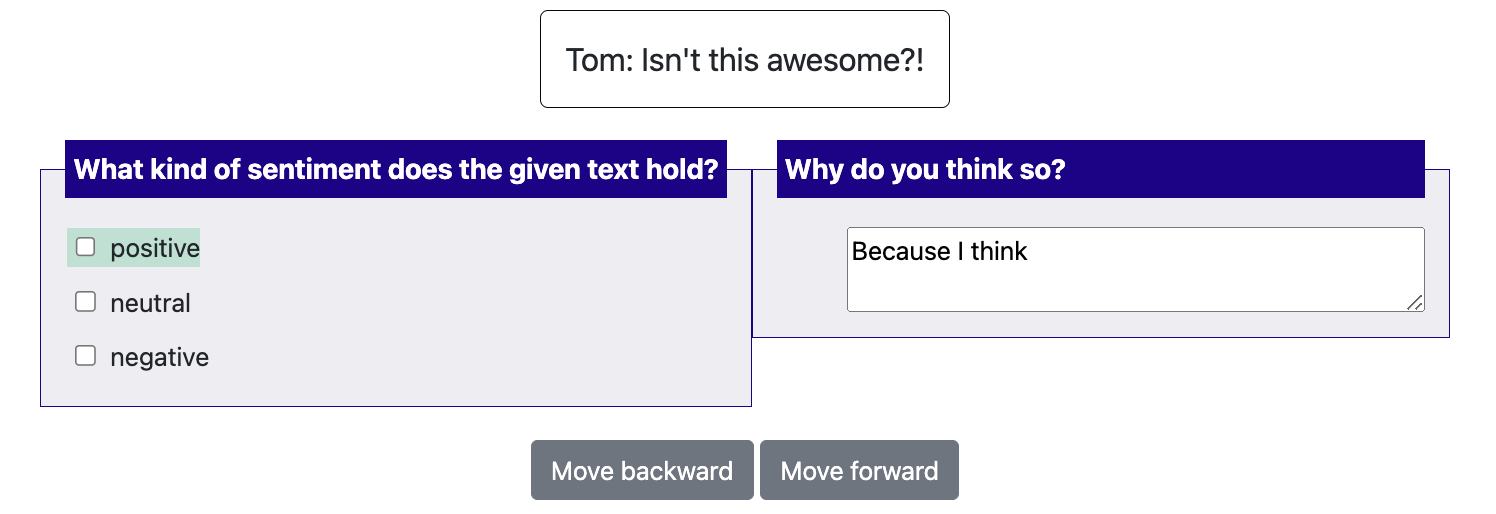
Starting from 1.2.2.1, Potato supports displaying suggestions to improve the productivity of annotators. Currently we
support two types of label suggestions: prefill and highlight. prefill will automatically
pre-select the labels or prefill the text inputs for the annotators while highlight will only
highlight the text of the labels. highlight can only be used for multiselect and radio.
prefill can also be used with textboxes.
There are two steps to set up label suggestions for your annotation tasks:
Step 1: modify your configuration file
Labels suggestions are defined for each scheme. In your configuration file, you can simply add
a field named label_suggestions to specific annotation schemes. You can use different suggestion
types for different schemes.
{
    "annotation_type": "multiselect",
    "name": "sentiment",
    "description": "What kind of sentiment does the given text hold?",
    "labels": [
       "positive", "neutral", "negative",
    ],

    # If true, numbers [1-len(labels)] will be bound to each
    # label. Aannotations with more than 10 are not supported with this
    # simple keybinding and will need to use the full item specification
    # to bind all labels to keys.
    "sequential_key_binding": True,

    #how to display the suggestions, currently support:
    # "highlight": highlight the suggested labels with color
    # "pre-select": directly prefill the suggested labels or content
    # otherwise this feature is turned off
    "label_suggestions":"highlight"
},
{
    "annotation_type": "text",
    "name": "explanation",
    "description": "Why do you think so?",
    # if you want to use multi-line textbox, turn on the text area and set the desired rows and cols of the textbox
    "textarea": {
      "on": True,
      "rows": 2,
      "cols": 40
    },
    #how to display the suggestions, currently support:
    # "highlight": highlight the suggested labels with color
    # "pre-select": directly prefill the suggested labels or content
    # otherwise this feature is turned off
    "label_suggestions": "prefill"
},
Step 2: prepare your data
For each line of your input data, you can add a field named label_suggestions. label_suggestions defines
a mapping from the scheme name to labels. For example:
{"id":"1","text":"Good Job!","label_suggestions": {"sentiment": "positive", "explanation": "Because I think "}}
{"id":"2","text":"Great work!","label_suggestions": {"sentiment": "positive", "explanation": "Because I think "}}
You can check out our example project in the potato-showcase repository regarding how to set up label suggestions