Annotation Schemas and Templates
potato supports multiple annotation schema types that can be configured in the "annotation_schemes" field of your YAML configuration file. Each schema defines how annotators interact with your data and what types of responses they can provide.
Screenshot Gallery
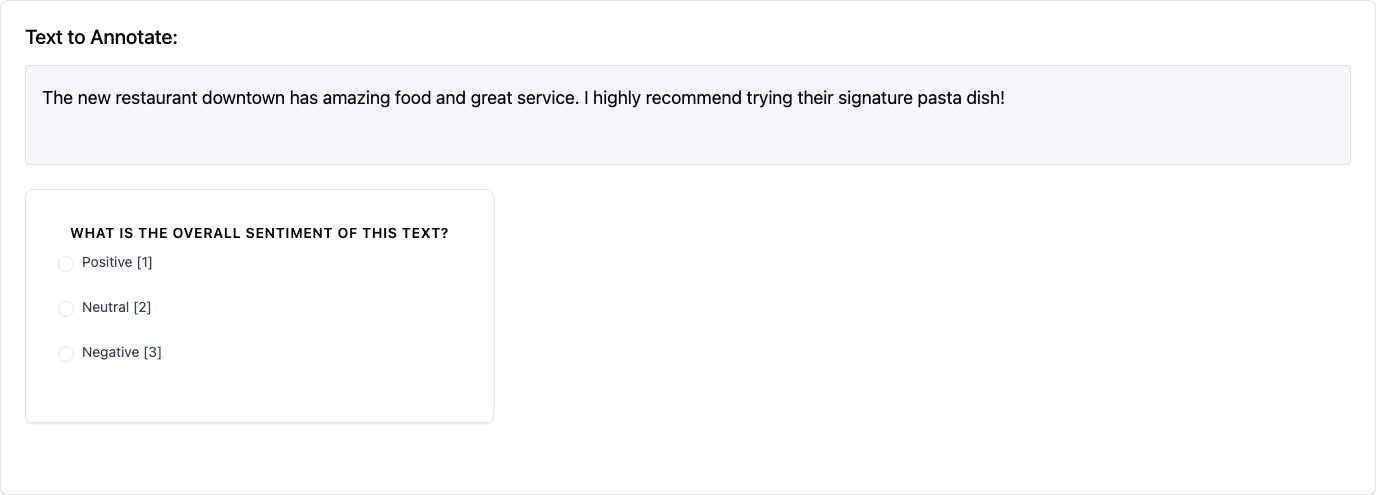
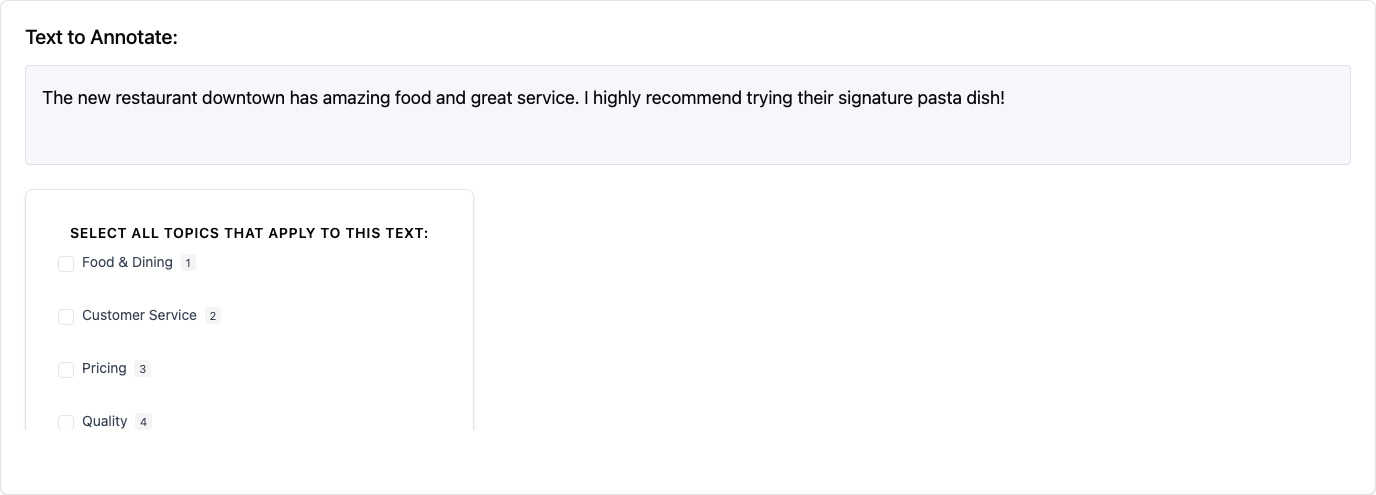
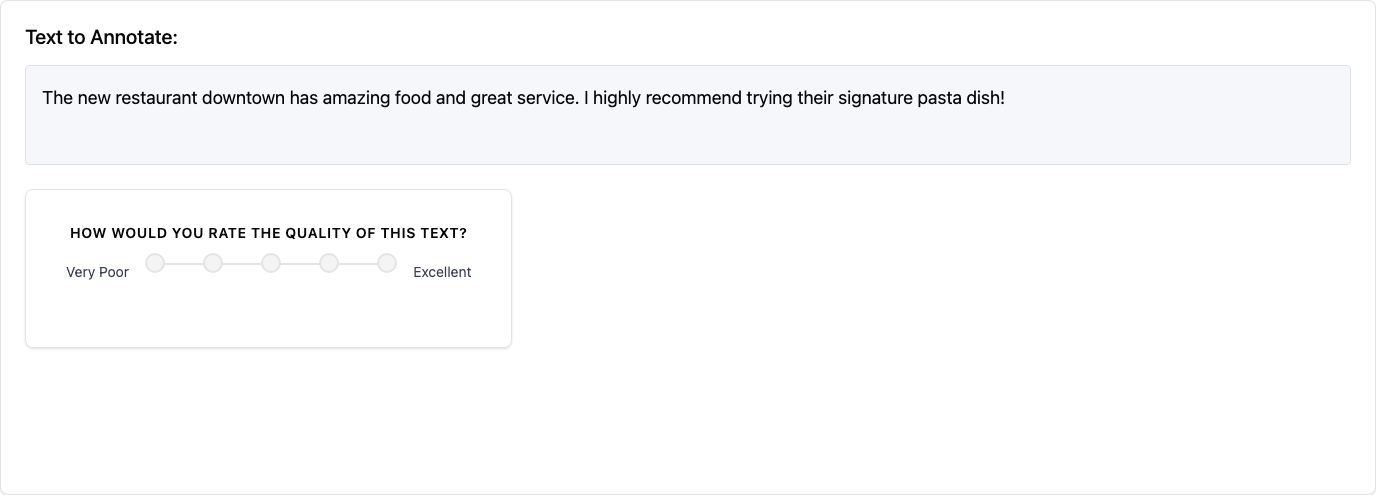
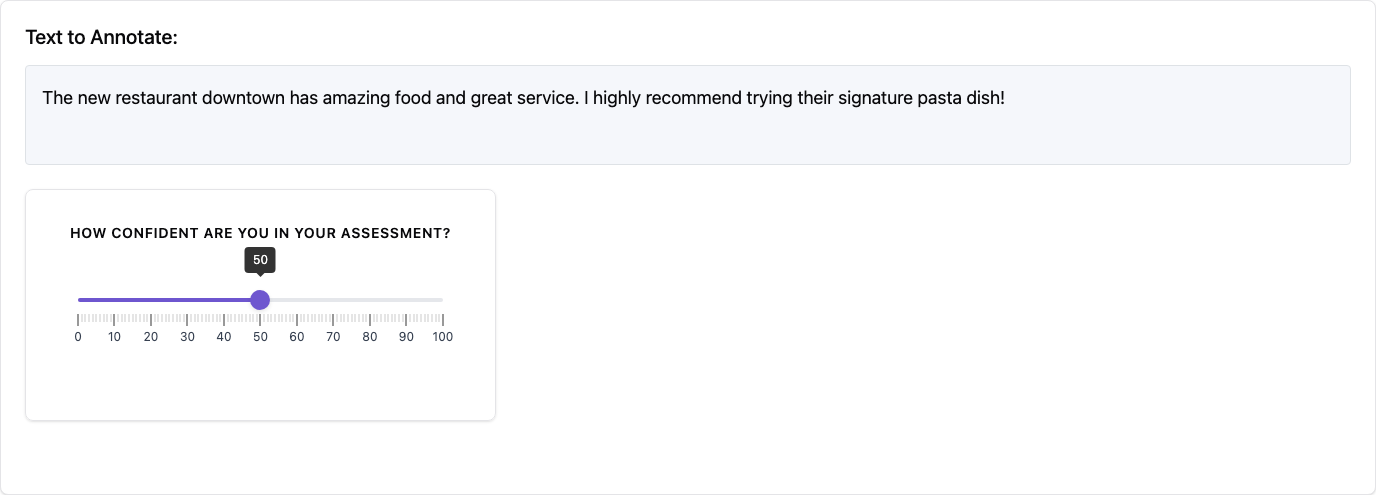
Below are examples of the different annotation schema types available in Potato:
| Radio Buttons | Checkbox / Multi-select | Likert Scale |
|---|---|---|
 |
 |
 |
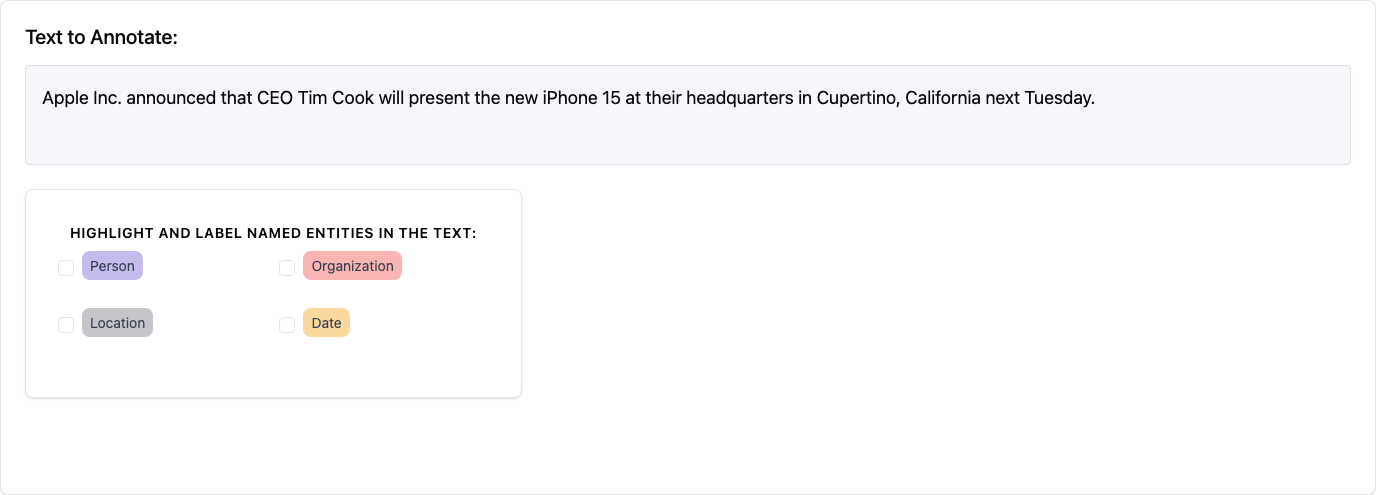
| Slider | Text Input | Span Annotation |
|---|---|---|
 |
 |
 |
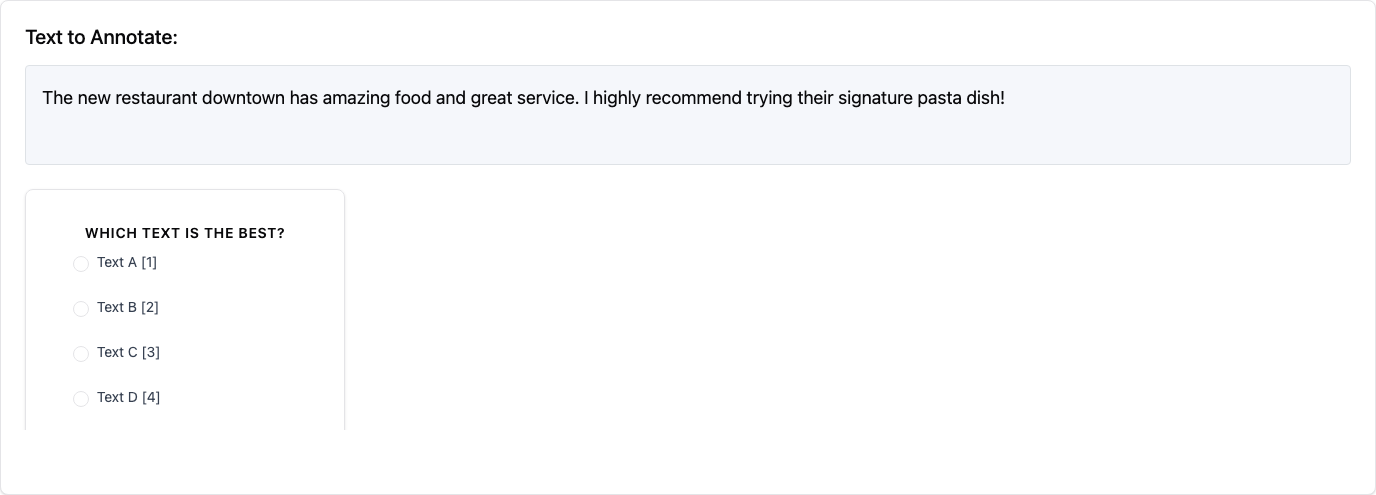
| Multi-rate Matrix | Pairwise Comparison | Best-Worst Scaling |
|---|---|---|
 |
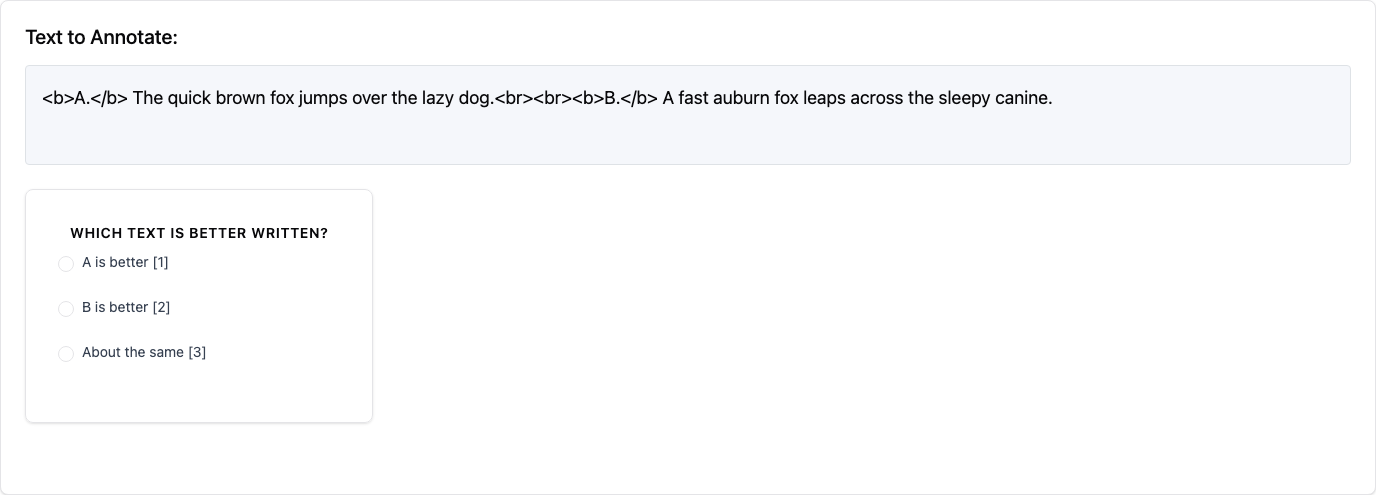 |
 |
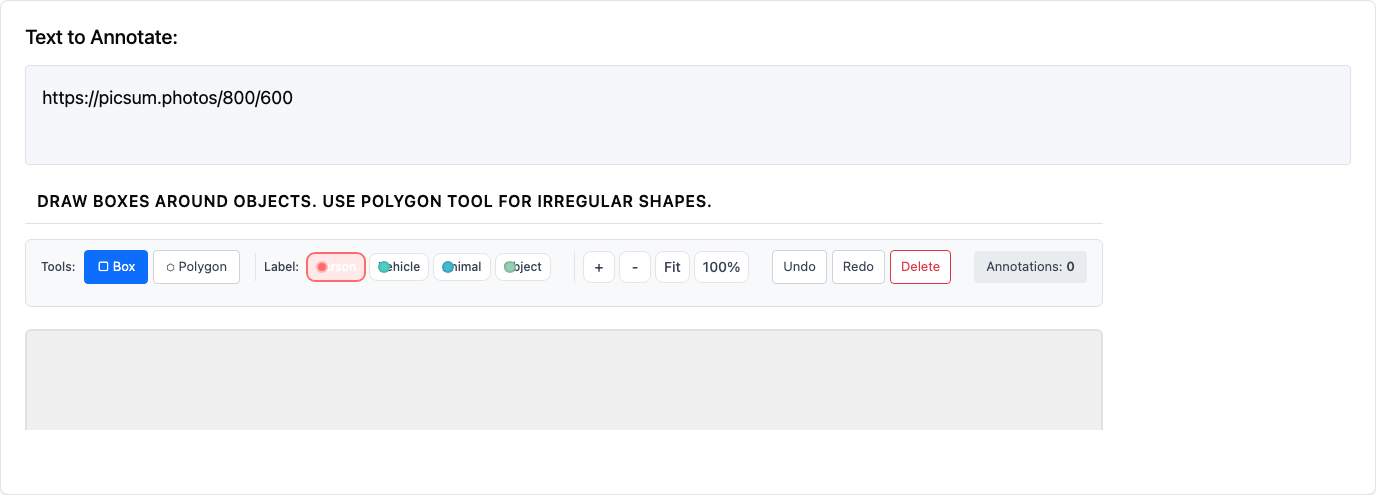
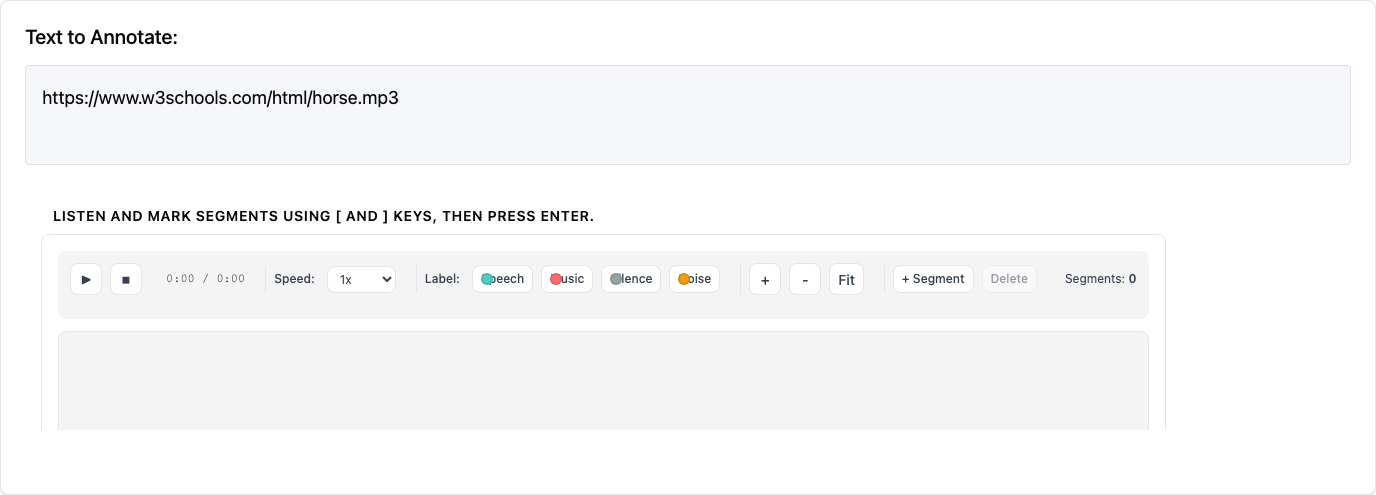
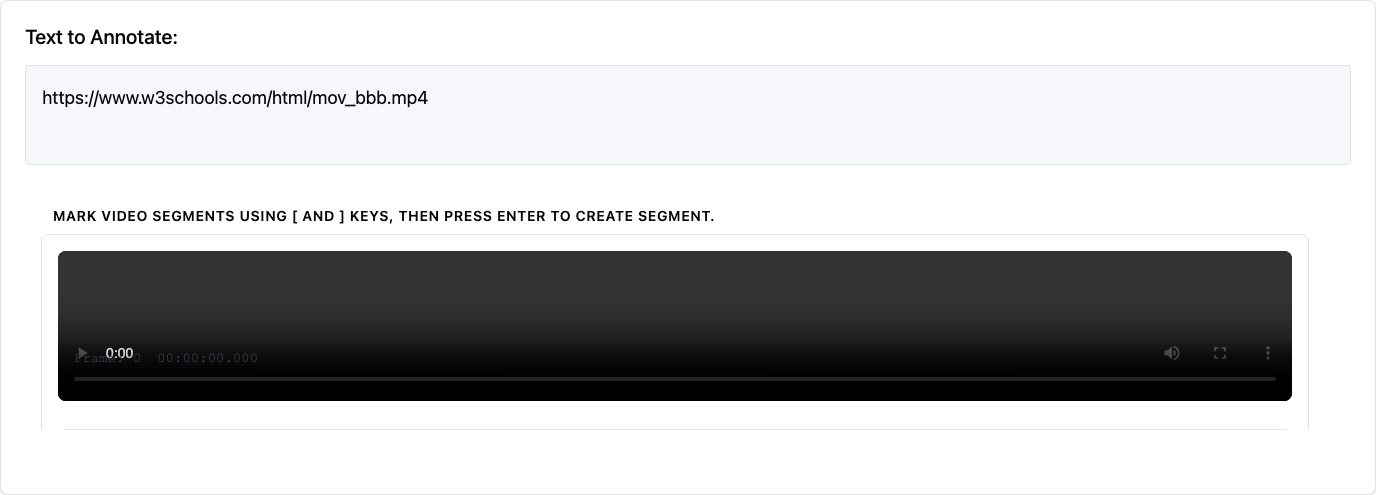
| Image Annotation | Audio Annotation | Video Annotation |
|---|---|---|
 |
 |
 |
| Triage | Coreference | Conversation Tree |
|---|---|---|
 |
 |
 |
| Soft Label | Constant Sum | Semantic Differential |
|---|---|---|
| Probability distribution sliders | Points allocation across categories | Bipolar adjective rating scales |
| Ranking | Range Slider | Hierarchical Multiselect |
|---|---|---|
| Drag-and-drop reordering | Dual-thumb min-max range | Tree taxonomy with checkboxes |
Core Schema Structure
All annotation schemas share these required fields:
annotation_type(string): The type of annotation interface to usename(string): Unique identifier for this schema, used in results reportingdescription(string): Text displayed to annotators explaining what to do
Additional fields are specific to each annotation type and may be required or optional.
Supported Annotation Types
1. Single Choice (radio)
Allows annotators to select exactly one option from a predefined list.
Required Fields:
- labels (list): Array of option labels to choose from
Optional Fields:
- sequential_key_binding (boolean): Enable keyboard shortcuts (1, 2, 3...)
- horizontal (boolean): Display options horizontally
Example:
annotation_schemes:
  - annotation_type: "radio"
    name: "topic_classification"
    description: "What is the main topic of this text?"
    labels: ["politics", "sports", "technology", "entertainment", "other"]
    sequential_key_binding: true
2. Likert Scale (likert)
Presents a rating scale with defined endpoints.
Required Fields:
- min_label (string): Text for the lowest rating
- max_label (string): Text for the highest rating
- size (integer): Number of scale points (minimum 2)
Optional Fields:
- sequential_key_binding (boolean): Enable keyboard shortcuts (1, 2, 3...)
Example:
annotation_schemes:
  - annotation_type: "likert"
    name: "quality_rating"
    description: "How would you rate the quality of this text?"
    min_label: "Very Poor"
    max_label: "Excellent"
    size: 5
    sequential_key_binding: true
3. Multiple Choice (multiselect)
Allows annotators to select multiple options from a predefined list.
Required Fields:
- labels (list): Array of option labels to choose from
Optional Fields:
- sequential_key_binding (boolean): Enable keyboard shortcuts (1, 2, 3...)
- single_select (boolean): Force single selection only (default: false)
- horizontal (boolean): Display options horizontally
- has_free_response (boolean): Add optional text input field
- video_as_label (boolean): Use video files as labels
- label_requirement (object): Set completion requirements
Example:
annotation_schemes:
  - annotation_type: "multiselect"
    name: "sentiment_analysis"
    description: "Select all emotions expressed in this text"
    labels: ["happy", "sad", "angry", "surprised", "neutral"]
    sequential_key_binding: true
    horizontal: true
Video Labels Example:
annotation_schemes:
  - annotation_type: "multiselect"
    name: "gif_appropriateness"
    description: "Select all appropriate GIF replies"
    video_as_label: true
    labels:
      - name: "{{instance_obj.gifs[0]}}"
        videopath: "/files/{{instance_obj.gifs_path[0]}}"
      - name: "{{instance_obj.gifs[1]}}"
        videopath: "/files/{{instance_obj.gifs_path[1]}}"
    sequential_key_binding: true
4. Text Span Selection (span)
Allows annotators to highlight and label specific text spans.
Required Fields:
- labels (list): Array of label categories for spans
Optional Fields:
- sequential_key_binding (boolean): Enable keyboard shortcuts
- bad_text_label (object): Option for marking text as unannotatable
- label_content (string): Text for the "bad text" option
Example:
annotation_schemes:
  - annotation_type: "span"
    name: "sentiment_spans"
    description: "Highlight positive and negative phrases"
    labels: ["positive", "negative", "neutral"]
    sequential_key_binding: true
    bad_text_label:
      label_content: "No answer"
5. Slider (slider)
Provides a continuous range for numerical ratings.
Required Fields:
- min (number): Minimum value
- max (number): Maximum value
Optional Fields:
- step (number): Increment size (default: 1)
- default (number): Default position
Example:
annotation_schemes:
  - annotation_type: "slider"
    name: "confidence_score"
    description: "How confident are you in your assessment?"
    min: 0
    max: 100
    step: 5
    default: 50
6. Text Input (text)
Allows free-form text responses.
Required Fields: None beyond the core fields
Optional Fields:
- labels (list): Multiple text input fields with labels
- textarea (object): Configure multi-line input
- on (boolean): Enable textarea mode
- rows (integer): Number of rows
- cols (integer): Number of columns
- allow_paste (boolean): Allow pasting (default: true)
Example:
annotation_schemes:
  - annotation_type: "text"
    name: "explanation"
    description: "Please explain your reasoning"
    textarea:
      on: true
      rows: 4
      cols: 50
    allow_paste: false
Multiple Text Fields Example:
annotation_schemes:
  - annotation_type: "text"
    name: "feedback"
    description: "Provide feedback on different aspects"
    labels: ["What worked well?", "What could be improved?", "Additional comments"]
7. Multi-rate (multirate)
Presents a matrix where multiple options are rated on the same scale.
Required Fields:
- options (list): Items to be rated
- labels (list): Rating scale labels
Optional Fields:
- display_config (object): Layout configuration
- num_columns (integer): Number of columns in the matrix
- arrangement (string): "vertical" or "horizontal"
- label_requirement (object): Set completion requirements
- required (boolean): Force completion of all ratings
- option_randomization (boolean): Randomize option order
- sequential_key_binding (boolean): Enable keyboard shortcuts
Example:
annotation_schemes:
  - annotation_type: "multirate"
    name: "aspect_ratings"
    description: "Rate each aspect of the product"
    options: ["Quality", "Price", "Design", "Functionality"]
    labels: ["Poor", "Fair", "Good", "Very Good", "Excellent"]
    display_config:
      num_columns: 2
    arrangement: "vertical"
    label_requirement:
      required: true
    option_randomization: true
8. Number Input (number)
Allows numerical input with optional constraints.
Required Fields: None beyond the core fields
Optional Fields:
- min (number): Minimum allowed value
- max (number): Maximum allowed value
- step (number): Increment size
Example:
annotation_schemes:
  - annotation_type: "number"
    name: "age"
    description: "What is your age?"
    min: 18
    max: 100
9. Image Annotation (image_annotation)
Allows annotators to draw bounding boxes, polygons, and place landmarks on images.
Required Fields:
- labels (list): Array of label categories for annotations
Optional Fields:
- annotation_mode (string): Drawing mode - "bbox", "polygon", or "landmark"
- allow_multiple (boolean): Allow multiple annotations per image
Example:
annotation_schemes:
  - annotation_type: "image_annotation"
    name: "object_detection"
    description: "Draw boxes around all vehicles"
    labels: ["car", "truck", "motorcycle", "bicycle"]
    annotation_mode: "bbox"
See Image Annotation for detailed documentation.
10. Audio Annotation (audio_annotation)
Allows annotators to segment and label audio files using waveform visualization.
Required Fields:
- labels (list): Array of label categories for audio segments
Optional Fields:
- show_waveform (boolean): Display waveform visualization (default: true)
- allow_overlapping (boolean): Allow overlapping segments
Example:
annotation_schemes:
  - annotation_type: "audio_annotation"
    name: "speaker_diarization"
    description: "Label who is speaking in each segment"
    labels: ["Speaker A", "Speaker B", "Overlap", "Silence"]
See Audio Annotation for detailed documentation.
11. Video Annotation (video_annotation)
Allows frame-by-frame labeling of video content with playback controls.
Required Fields:
- labels (list): Array of label categories
Optional Fields:
- annotation_mode (string): "frame" for frame-by-frame, "segment" for time segments
- frame_step (number): Frame advance increment
Example:
annotation_schemes:
  - annotation_type: "video_annotation"
    name: "action_recognition"
    description: "Label the action being performed"
    labels: ["walking", "running", "sitting", "standing"]
    annotation_mode: "frame"
See Video Annotation for detailed documentation.
12. Triage (triage)
Prodigy-style binary accept/reject/skip interface for rapid data curation tasks.
Required Fields: None beyond the core fields
Optional Fields:
- accept_label (string): Label for accept button (default: "Keep")
- reject_label (string): Label for reject button (default: "Discard")
- skip_label (string): Label for skip button (default: "Unsure")
- auto_advance (boolean): Auto-advance to next item (default: true)
- show_progress (boolean): Show progress bar (default: true)
- accept_key (string): Keyboard shortcut for accept (default: "1")
- reject_key (string): Keyboard shortcut for reject (default: "2")
- skip_key (string): Keyboard shortcut for skip (default: "3")
Example:
annotation_schemes:
  - annotation_type: "triage"
    name: "data_quality"
    description: "Is this data sample suitable for training?"
    auto_advance: true
    show_progress: true
See Triage for detailed documentation.
13. Coreference Chains (coreference)
Groups text spans that refer to the same entity into coreference chains.
Required Fields:
- span_schema (string): Name of the span schema providing mentions
Optional Fields:
- entity_types (list): Entity type categories for classification
- allow_singletons (boolean): Allow single-mention chains (default: true)
- visual_display.highlight_mode (string): Display style - "background", "bracket", or "underline"
Example:
annotation_schemes:
  - annotation_type: "span"
    name: "mentions"
    description: "Highlight entity mentions"
    labels: ["MENTION"]

  - annotation_type: "coreference"
    name: "entity_chains"
    description: "Group mentions of the same entity"
    span_schema: "mentions"
    entity_types: ["PERSON", "ORGANIZATION", "LOCATION"]
See Coreference Annotation for detailed documentation.
14. Conversation Tree (tree_annotation)
Enables annotation of hierarchical conversation structures with per-node rating and path selection.
Required Fields: None beyond the core fields
Optional Fields:
- node_scheme (object): Annotation scheme for individual nodes
- path_selection.enabled (boolean): Enable path selection
- path_selection.description (string): Path selection instructions
- branch_comparison.enabled (boolean): Enable branch comparison mode
Example:
annotation_schemes:
  - annotation_type: "tree_annotation"
    name: "response_eval"
    description: "Evaluate conversation responses"
    node_scheme:
      annotation_type: "likert"
      min_label: "Poor"
      max_label: "Excellent"
      size: 5
    path_selection:
      enabled: true
      description: "Select the best conversation path"
See Conversation Tree Annotation for detailed documentation.
15. Tiered Annotation (tiered_annotation)
ELAN-style hierarchical multi-tier annotation for audio and video content. Supports parent-child relationships between tiers with various constraint types.
Required Fields:
- source_field (string): Field name containing media URL
- tiers (list): List of tier definitions
Optional Fields:
- media_type (string): "audio" or "video" (default: "audio")
- tier_height (integer): Height per tier row in pixels (default: 50)
- show_tier_labels (boolean): Show tier name labels (default: true)
- collapsed_tiers (list): Tier names to start collapsed
- zoom_enabled (boolean): Enable zoom controls (default: true)
- playback_rate_control (boolean): Show playback speed controls (default: true)
Tier Definition:
- name (string): Tier identifier
- tier_type (string): "independent" or "dependent"
- parent_tier (string): Parent tier name (for dependent tiers)
- constraint_type (string): "time_subdivision", "included_in", "symbolic_association", or "symbolic_subdivision"
- labels (list): Available annotation labels with name and color
Example:
annotation_schemes:
  - annotation_type: "tiered_annotation"
    name: "linguistic_tiers"
    description: "Annotate speech with hierarchical tiers"
    source_field: audio_url
    media_type: audio
    tiers:
      - name: utterance
        tier_type: independent
        labels:
          - name: Speaker_A
            color: "#4ECDC4"
          - name: Speaker_B
            color: "#FF6B6B"
      - name: word
        tier_type: dependent
        parent_tier: utterance
        constraint_type: time_subdivision
        labels:
          - name: Word
            color: "#95E1D3"
See Tiered Annotation for detailed documentation.
16. Visual Analog Scale (vas)
A continuous line scale with no tick marks or discrete bins. Returns a precise float value. Psychophysically superior to Likert scales for fine-grained judgments.
annotation_schemes:
  - annotation_type: vas
    name: pain_level
    description: "Rate the intensity of pain described"
    left_label: "No pain"
    right_label: "Worst imaginable"
    min_value: 0
    max_value: 100
    show_value: false
See Visual Analog Scale for detailed documentation.
17. Extractive QA (extractive_qa)
SQuAD-style question answering — display a question, annotator highlights the answer span in the passage.
annotation_schemes:
  - annotation_type: extractive_qa
    name: answer_span
    description: "Highlight the answer in the passage"
    question_field: "question"
    allow_unanswerable: true
See Extractive QA for detailed documentation.
18. Rubric Evaluation (rubric_eval)
Multi-criteria rating grid for LLM evaluation. Rate items on multiple criteria simultaneously.
annotation_schemes:
  - annotation_type: rubric_eval
    name: quality
    description: "Evaluate response quality"
    scale_points: 5
    criteria:
      - name: helpfulness
        description: "Does it answer the question?"
      - name: accuracy
        description: "Is the information correct?"
    show_overall: true
See Rubric Evaluation for detailed documentation.
19. Text Edit / Post-Edit (text_edit)
Inline text editing with real-time diff visualization and edit distance tracking.
annotation_schemes:
  - annotation_type: text_edit
    name: post_edit
    description: "Correct the machine translation"
    source_field: "mt_output"
    show_diff: true
    show_edit_distance: true
See Text Edit for detailed documentation.
20. Error Span with Typed Severity (error_span)
MQM-style error annotation — mark error spans with configurable error types, severity levels, and quality scoring.
annotation_schemes:
  - annotation_type: error_span
    name: translation_quality
    description: "Mark errors in the translation"
    error_types:
      - name: Accuracy
        subtypes: ["Omission", "Mistranslation"]
      - name: Fluency
        subtypes: ["Grammar", "Spelling"]
    show_score: true
See Error Span for detailed documentation.
21. Card Sorting (card_sort)
Drag-and-drop grouping of items into predefined or user-created categories.
annotation_schemes:
  - annotation_type: card_sort
    name: topic_groups
    description: "Sort items into topic groups"
    mode: closed
    groups: ["Science", "Politics", "Sports"]
    items_field: "items"
See Card Sorting for detailed documentation.
22. Conjoint Analysis (conjoint)
Discrete choice between multi-attribute profile cards for preference elicitation and attribute importance estimation.
annotation_schemes:
  - annotation_type: conjoint
    name: preference
    description: "Which option do you prefer?"
    profiles_per_set: 3
    attributes:
      - name: Speed
        levels: ["Fast", "Medium", "Slow"]
      - name: Price
        levels: ["$10", "$20", "$50"]
    show_none_option: true
See Conjoint Analysis for detailed documentation.
23. Process Reward (process_reward)
Binary per-step correctness signals for Process Reward Model (PRM) training. Two modes: first_error (click first wrong step, rest auto-marked) and per_step (annotate each independently).
  - annotation_type: process_reward
    name: step_rewards
    description: "Mark the first incorrect step"
    steps_key: structured_turns
    mode: first_error
See Coding Agent Annotation for detailed documentation.
24. Code Review (code_review)
GitHub PR review-style annotation with inline diff comments, file-level ratings, and overall verdict. Click on diff lines in the coding_trace display to add comments.
  - annotation_type: code_review
    name: review
    description: "Review the code changes"
    comment_categories: [bug, style, suggestion, security]
    verdict_options: [approve, request_changes, comment_only]
    file_rating_dimensions: [correctness, quality]
See Coding Agent Annotation for detailed documentation.
25. Dropdown Selection (select)
A dropdown menu for selecting a single option from a predefined list. Supports predefined datasets (country, ethnicity, religion).
Required Fields:
- labels (list): Array of option labels
Optional Fields:
- use_predefined_labels (string): Use built-in label sets - "country", "ethnicity", or "religion"
Example:
annotation_schemes:
  - annotation_type: "select"
    name: "genre"
    description: "Select the genre of this text"
    labels: ["news", "opinion", "review", "social_media"]
26. Span Linking (span_link)
Creates typed relationships between previously annotated spans. Works with a span annotation schema to add directed or undirected links with visual arc rendering.
Required Fields:
- span_schema (string): Name of the span schema to link from
- link_types (list): Link type definitions with name and optional constraints
Optional Fields:
- link_types[].directed (boolean): Whether link is directed (default: false)
- link_types[].allowed_source_labels / allowed_target_labels (list): Constrain which span labels can be source/target
- visual_display (object): Arc rendering options
Example:
annotation_schemes:
  - annotation_type: "span_link"
    name: "relations"
    description: "Annotate relationships between entities"
    span_schema: "entities"
    link_types:
      - name: "WORKS_FOR"
        directed: true
        allowed_source_labels: ["PERSON"]
        allowed_target_labels: ["ORGANIZATION"]
See Span Linking for detailed documentation.
27. Display Only (pure_display)
Renders read-only text content without interactive elements. Useful for instructions, headers, or formatted content within annotation forms.
Required Fields:
- description (string): Text to display (supports markdown-style headers)
Optional Fields:
- labels (list): Additional text content to render
- allow_html (boolean): Enable sanitized HTML rendering
Example:
annotation_schemes:
  - annotation_type: "pure_display"
    name: "instructions"
    description: "## Please read the text carefully before annotating"
28. Video Player (video)
Embeds a video player for display alongside other annotation schemas. This is for video playback only — use video_annotation for annotating video content.
Required Fields:
- video_path (string): Path to video file or URL
Optional Fields:
- autoplay (boolean): Auto-start playback (default: false)
- loop (boolean): Loop playback (default: false)
- controls (boolean): Show player controls (default: true)
- custom_css (object): Width/height settings
Example:
annotation_schemes:
  - annotation_type: "video"
    name: "video_display"
    description: "Watch the video below"
    video_path: "videos/sample.mp4"
    controls: true
29. Pairwise Comparison (pairwise)
Compares two items side-by-side with three modes: binary (clickable tiles), scale (slider), or multi_dimension (multiple dimensions).
Required Fields:
- mode (string): "binary", "scale", or "multi_dimension"
Optional Fields:
- labels (list): Custom labels for items (default: ["A", "B"])
- allow_tie (boolean): Show tie/no-preference option (default: false)
- scale (object): For scale mode — min, max, step, labels.min/max/center
- dimensions (list): For multi_dimension mode — list of comparison dimensions
- justification (object): Optional reason selection and rationale textarea
- sequential_key_binding (boolean): Enable keyboard shortcuts
Example:
annotation_schemes:
  - annotation_type: "pairwise"
    name: "preference"
    description: "Which response is better?"
    mode: "binary"
    labels: ["Response A", "Response B"]
    allow_tie: true
See Pairwise Comparison for detailed documentation.
30. Event Annotation (event_annotation)
Marks events with triggers and typed arguments. Works with span annotations to identify trigger words and fill argument roles.
Required Fields:
- span_schema (string): Name of the span schema for entities/triggers
- event_types (list): Event type definitions with arguments
Optional Fields:
- event_types[].trigger_labels (list): Span labels that can trigger this event
- event_types[].arguments[].required (boolean): Whether argument is mandatory
- visual_display (object): Arc rendering options
Example:
annotation_schemes:
  - annotation_type: "event_annotation"
    name: "events"
    description: "Annotate events with triggers and arguments"
    span_schema: "entities"
    event_types:
      - type: "ATTACK"
        trigger_labels: ["EVENT_TRIGGER"]
        arguments:
          - role: "attacker"
            entity_types: ["PERSON", "ORGANIZATION"]
See Event Annotation for detailed documentation.
31. Best-Worst Scaling (bws)
Select best and worst items from a tuple for efficient ordinal ranking. Keyboard shortcuts enable rapid annotation.
Required Fields:
- best_description (string): Question text for best selection
- worst_description (string): Question text for worst selection
Optional Fields:
- tuple_size (integer): Items per tuple (default: 4)
- sequential_key_binding (boolean): Enable keyboard shortcuts
Example:
annotation_schemes:
  - annotation_type: "bws"
    name: "sentiment_bws"
    description: "Sentiment Intensity"
    best_description: "Which expresses the MOST positive sentiment?"
    worst_description: "Which expresses the LEAST positive sentiment?"
See Best-Worst Scaling for detailed documentation.
32. Soft Label / Probability Distribution (soft_label)
Constrained sliders where values must sum to a fixed total (default 100). Annotators distribute probability across labels.
Required Fields:
- labels (list): Label names for distribution
Optional Fields:
- total (number): Sum constraint (default: 100)
- min_per_label (number): Minimum per label (default: 0)
- show_distribution_chart (boolean): Show bar chart visualization (default: true)
Example:
annotation_schemes:
  - annotation_type: "soft_label"
    name: "sentiment_dist"
    description: "Distribute probability across sentiment labels"
    labels: ["Positive", "Neutral", "Negative"]
    total: 100
See Soft Label for detailed documentation.
33. Confidence Rating (confidence)
Rates annotator confidence paired with a primary annotation. Supports Likert-style discrete scale or continuous slider.
Required Fields: - (none beyond core fields)
Optional Fields:
- target_schema (string): Name of the primary schema this confidence is for
- scale_type (string): "likert" (default) or "slider"
- scale_points (integer): Number of points for Likert (default: 5)
- labels (list): Custom scale labels
Example:
annotation_schemes:
  - annotation_type: "confidence"
    name: "confidence"
    description: "How confident are you in your label?"
    target_schema: "sentiment"
    scale_points: 5
See Confidence Annotation for detailed documentation.
34. Constant Sum / Points Allocation (constant_sum)
Distributes a fixed point budget across categories using number inputs or sliders.
Required Fields:
- labels (list): Category names
Optional Fields:
- total_points (number): Point budget (default: 100)
- min_per_item (number): Minimum per item (default: 0)
- input_type (string): "number" (default) or "slider"
Example:
annotation_schemes:
  - annotation_type: "constant_sum"
    name: "topic_relevance"
    description: "Allocate 100 points across topics by relevance"
    labels: ["Politics", "Technology", "Sports"]
    total_points: 100
See Constant Sum for detailed documentation.
35. Semantic Differential (semantic_differential)
Matrix of bipolar adjective scales. Each row pairs left and right poles with radio buttons between them.
Required Fields:
- pairs (list): List of [left_adjective, right_adjective] pairs
Optional Fields:
- scale_points (integer): Number of points per scale (default: 7)
Example:
annotation_schemes:
  - annotation_type: "semantic_differential"
    name: "word_connotation"
    description: "Rate the word on each dimension"
    scale_points: 7
    pairs:
      - ["Good", "Bad"]
      - ["Strong", "Weak"]
      - ["Active", "Passive"]
See Semantic Differential for detailed documentation.
36. Ranking / Drag-and-Drop (ranking)
Draggable list for reordering items by preference or quality. Supports mouse drag, arrow buttons, and keyboard controls.
Required Fields:
- labels (list): Items to rank
Optional Fields:
- allow_ties (boolean): Whether ties are allowed (default: false)
Example:
annotation_schemes:
  - annotation_type: "ranking"
    name: "response_quality"
    description: "Rank responses from best to worst"
    labels: ["Response A", "Response B", "Response C"]
See Ranking for detailed documentation.
37. Range Slider / Dual-Thumb (range_slider)
Goldilocks slider with two draggable handles for selecting a min-max range.
Required Fields: - (none beyond core fields)
Optional Fields:
- min_value (number): Minimum value (default: 0)
- max_value (number): Maximum value (default: 100)
- step (number): Step size (default: 1)
- left_label / right_label (string): Endpoint labels
- show_values (boolean): Display numeric values (default: true)
Example:
annotation_schemes:
  - annotation_type: "range_slider"
    name: "formality_range"
    description: "What range of formality is appropriate?"
    min_value: 0
    max_value: 100
    left_label: "Very informal"
    right_label: "Very formal"
See Range Slider for detailed documentation.
38. Hierarchical Multi-Label Selection (hierarchical_multiselect)
Expandable/collapsible tree of checkboxes for hierarchical taxonomy selection. Supports automatic parent/child selection and search filtering.
Required Fields:
- taxonomy (object): Nested dict/list defining the label hierarchy
Optional Fields:
- auto_select_children (boolean): Auto-select children when parent selected (default: false)
- auto_select_parent (boolean): Auto-select parent when all children selected (default: false)
- show_search (boolean): Show search/filter box (default: false)
- max_selections (integer): Maximum selections allowed
Example:
annotation_schemes:
  - annotation_type: "hierarchical_multiselect"
    name: "topic_hierarchy"
    description: "Select topics that apply"
    taxonomy:
      Science:
        Physics: ["Quantum Mechanics", "Thermodynamics"]
        Biology: ["Genetics"]
      Technology: ["AI", "Blockchain"]
    show_search: true
See Hierarchical Multi-Label Selection for detailed documentation.
39. Trajectory Evaluation (trajectory_eval)
Per-step error marking for agent/LLM traces. Marks each step with correctness status, structured error types, severity levels, and optional scoring.
Required Fields: - (none beyond core fields)
Optional Fields:
- steps_key (string): Key in instance data containing steps (default: "steps")
- step_text_key (string): Key for step text (default: "action")
- correctness_options (list): Status options (default: ["correct", "incorrect", "partially_correct"])
- error_types (list): Error type definitions with optional subtypes
- severities (list): Severity levels with penalty weights
- show_score (boolean): Display cumulative score (default: true)
Example:
annotation_schemes:
  - annotation_type: "trajectory_eval"
    name: "step_evaluation"
    description: "Evaluate each agent step"
    steps_key: "steps"
    error_types:
      - name: "reasoning"
        subtypes: ["logical_error", "factual_error"]
      - name: "execution"
        subtypes: ["wrong_tool", "wrong_args"]
    severities:
      - name: "minor"
        weight: -1
      - name: "major"
        weight: -5
See Trajectory Evaluation for detailed documentation.
Advanced Features
Discontinuous Span Selection
For span annotation, you can enable discontinuous span selection, allowing annotators to select multiple non-contiguous text ranges as part of a single span annotation:
annotation_schemes:
  - annotation_type: "span"
    name: "phrases"
    description: "Highlight relevant phrases (Ctrl/Cmd+click to add more)"
    labels: ["RELEVANT", "IRRELEVANT"]
    allow_discontinuous: true
When enabled: - Hold Ctrl (Windows/Linux) or Cmd (Mac) while selecting text to add additional ranges - All selected ranges are stored as part of the same annotation - Useful for split antecedents, discontinuous constituents, or multi-part expressions
Entity Linking
Span annotations can be linked to external knowledge bases like Wikidata:
annotation_schemes:
  - annotation_type: "span"
    name: "ner"
    description: "Highlight and link named entities"
    labels: ["PERSON", "ORG", "LOC"]
    entity_linking:
      enabled: true
      knowledge_bases:
        - name: wikidata
          type: wikidata
          language: en
      auto_search: true
      required: false
See Entity Linking for detailed documentation.
Keyboard Shortcuts
Most annotation types support sequential_key_binding: true to enable keyboard shortcuts:
- Numbers 1-9 map to the first 9 options in the order they are listed
- For more than 9 options, use custom key bindings
Tooltips
Add tooltips to labels for additional guidance:
labels:
  - name: "Economic"
    tooltip_file: "config/tooltips/economic.html"
    key_value: "1"
Label Requirements
The label_requirement field controls validation behavior for annotation schemas:
General Required Validation:
label_requirement:
  required: true  # Makes all fields in this schema required
Specific Label Required Validation:
label_requirement:
  required_label: "specific_option"  # Only this specific option is required
Multiple Labels Required:
label_requirement:
  required_label: ["option1", "option2"]  # Only these specific options are required
When required: true is set, annotators must complete all fields in the schema before they can proceed to the next instance. This is particularly useful for ensuring data quality in multi-rate and other complex annotation tasks.
Multiple Schemas
Combine different annotation types in a single task:
annotation_schemes:
  - annotation_type: "radio"
    name: "overall_sentiment"
    description: "What is the overall sentiment?"
    labels: ["positive", "negative", "neutral"]

  - annotation_type: "span"
    name: "sentiment_spans"
    description: "Highlight specific sentiment phrases"
    labels: ["positive", "negative"]

  - annotation_type: "text"
    name: "explanation"
    description: "Explain your reasoning"
Configuration Options
Task-Level Settings
# Page title
annotation_task_name: "Sentiment Analysis Task"

# Codebook URL (displayed to annotators)
annotation_codebook_url: "https://docs.google.com/document/d/example"

# Hide navigation bar (for crowdworking)
hide_navbar: false

# HTML layout template
html_layout: "default"  # Options: default, fixed_keybinding, kwargs, or custom path
Available Layout Templates
default: General-purpose layout for most annotation tasksfixed_keybinding: Shows keyboard shortcuts prominentlykwargs: Specialized layout for Likert scales with custom endpoints- Custom path: Point to your own HTML template file
Surveyflow Layout
Use different layouts for survey pages vs annotation pages:
html_layout: "templates/annotation-layout.html"
surveyflow_html_layout: "default"
Best Practices
- Use descriptive names: Schema names appear in results, so make them meaningful
- Provide clear descriptions: Help annotators understand exactly what to do
- Enable keyboard shortcuts: Improves annotation speed for experienced users
- Test your configuration: Verify the interface works as expected before deployment
- Consider annotation quality: Use required fields and validation where appropriate
- Keep it simple: Avoid overly complex schemas that may confuse annotators
Examples and Templates
For complete working examples, see the examples directory which contains ready-to-use configurations for various annotation tasks.
Customizing the Instance Area
If you want to make changes to the instance area, simply edit the corresponding div:
<div id="instance-text" name="instance_text" style="max-width:400px;">
    {{instance | safe}}
</div>
This will change the max-width of the instance area.